Food connects people to memory, culture, and family. For many older adults, food also plays an important role in long-term health and brain function.
Mike Bavuso understands this connection well. He serves as the Dining Service Director at Waterstone of Lexington, where he leads the culinary team and sets the approach to daily dining.
Mike grew up in an Italian household where his mother’s cooking shaped family life. She made food the centerpiece of every occasion.
Mike spent his early years learning her techniques and developing a lasting passion for cooking. He now brings this passion to Waterstone of Lexington.
He recently won the “Battle of the Chefs” tournament at Waterstone for the second year running. He competed against other Waterstone chefs to secure the title.
“The beginning of a dynasty,” he says.
And yet, humility remains; he admits he has not yet surpassed his mother’s skills.
We spoke with Mike about how food supports brain health, how Waterstone approaches nutrition, and what older adults can do at home to eat well as they age.
Watch the short interview below, or continue reading:
How Does Waterstone Approach Dining?
Dining at Waterstone is centered on fresh preparation, resident choice, and flexible menus that support both enjoyment and overall wellness.
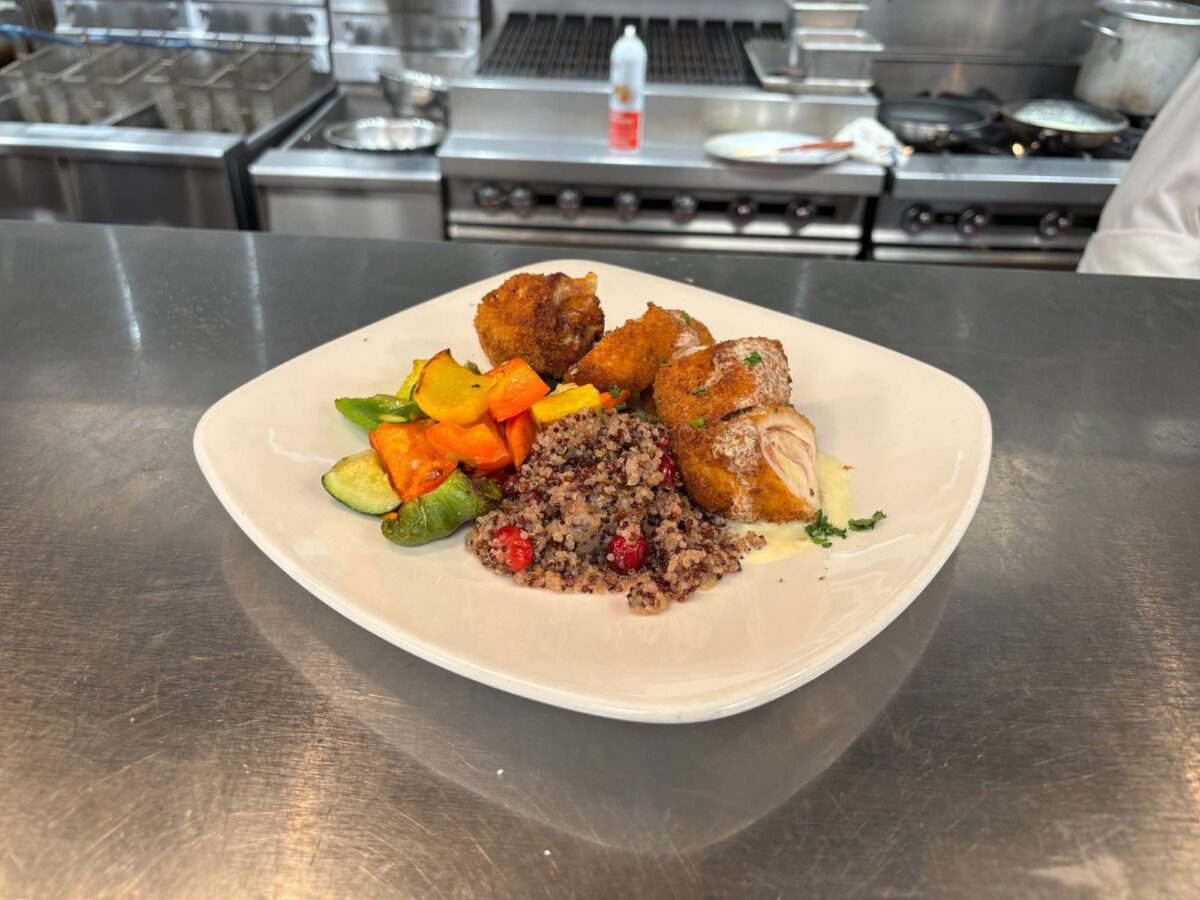
“At Waterstone, we cook the way we would in a fine restaurant,” Mike explains. “We focus on flavor, balance, and presentation every day.”
Mike and his team base their menus on a Mediterranean-inspired approach to dining. This style emphasizes vegetables, whole grains, fish, and healthy fats. Chefs use olive oil and avocado oil in place of heavier fats. They rely on herbs, citrus, and vegetables to build flavor instead of salt.
Waterstone kitchens use a fresh-to-order cooking model. The team prepares meals when residents place their orders. They do not cook food in large batches and hold it for service.
“We cook each plate as it is ordered,” Mike says. “If someone needs less salt or has a specific request, we can adjust the meal right away.”
This level of flexibility matters in senior living. Many older adults manage health conditions that affect how they eat. Personalized cooking allows residents to enjoy meals that match their needs without sacrificing taste.
Mike also values feedback from residents. He encourages people to share what they enjoy and what they want improved. Dining teams use this input to adjust menus, refine recipes, and improve service.
For prospective residents, this approach offers an important signal. Dining at Waterstone does not follow a one-size-fits-all model. The kitchen adapts to the people it serves, which helps make daily meals both enjoyable and supportive of long-term health.
This approach reflects what many older adults should expect from modern senior living dining.
After all, it’s not really a restaurant that people frequent, but a place where residents come every day to eat. It is part of their home.
Why Is the Mediterranean Diet Good for Your Brain?
As mentioned, Mike centers his nutrition approach on the Mediterranean diet. This style of eating favors whole foods and simple preparation. It includes vegetables, whole grains, lean proteins, and healthy fats.
“We build our menus around foods that support the brain,” Mike says. “The goal is to help people feel sharp and energized through what they eat.”
The Mediterranean diet supports brain health by emphasizing anti-inflammatory ingredients that help protect cognitive function as we age.
Rather than focus on complex science, Mike keeps the message practical. He believes people benefit most when they understand how food affects how they feel each day.
“The right foods help your brain work better for longer,” Mike explains.
Mike also stresses the importance of moderation. He does not encourage extreme dietary changes. For example, he cautions against replacing all sugar with artificial sweeteners.
“Artificial sweeteners often leave people unsatisfied,” Mike says. “A small amount of real sugar can make more sense when used with care.”
Moderation requires awareness. A controlled portion can be a rare treat without undermining health goals. This balanced mindset guides how Mike plans menus at Waterstone and how he advises older adults who cook at home.

Mike’s Tips for Cooking at Home
Mike believes older adults can apply professional kitchen habits at home. He encourages simple, approachable cooking habits that make nutritious meals easier to prepare and more enjoyable at home. He also advises shoppers to seek out local markets when possible.
“The quality of the ingredient matters more than the complexity of the recipe,” Mike says.
Tip One: Cook Smart
Mike recommends using a multi-cooker such as an Instant Pot. This tool shortens cooking time and simplifies meal preparation. Pressure cooking uses steam to cook food evenly. This process helps preserve important nutrients.
“An Instant Pot allows people to cook healthy meals without standing over the stove,” Mike explains.
It’s also a great option to cook something in large quantities that you can then eat again for later meals.
Tip Two: Prepare Ahead
Preparation reduces stress during cooking. Chefs refer to this method as mise en place. The term means having everything ready before cooking begins.
Mise en place includes gathering your tools, reviewing the recipe, and preparing ingredients before you begin cooking. It also includes completing some tasks earlier in the day or week.
Mike suggests chopping vegetables or portioning proteins when energy levels are highest. He also recommends cooking grains such as quinoa or brown rice in larger batches. These ingredients can support several meals throughout the week.
Preparation removes barriers that often prevent people from cooking at home. Committing to cooking something on a weekday evening becomes much easier if you have done some of the work already.
Tip Three: Focus on Key Nutrients
Protein plays an important role in healthy aging. Muscle mass decreases over time, which can affect strength and mobility. Regular protein intake helps slow this process.
“Older adults often need more protein than they realize,” Mike says.
Hydration also requires attention. The sensation of thirst weakens with age, but drinking water helps prevent fatigue, dizziness, and confusion.
Mike encourages people to drink water throughout the day. He advises them to drink water even when they do not feel thirsty, making it a simple habit you do regardless of any feelings of thirst.
The Mediterranean Diet: A Simple Guide
Mike encourages people to simplify how they think about food. He believes most healthy meals begin with consistent grocery choices. When people focus on the right categories, planning and cooking feel more manageable.
“The Mediterranean diet works because it fits into real life,” Mike says. “People can follow it without feeling overwhelmed.”
This table outlines the food categories; simply pick and choose from each category per meal, and you won’t go far wrong. These foods appear regularly on Waterstone menus and adapt easily to meals at home.
Perhaps you could save the table for your own reference to use later:
| Food Category | Best Choices | Why It Matters | Usage Tip |
| Healthy Fats | Olive oil, avocado oil, nuts, seeds | Supports brain health and reduces inflammation in the body | Use olive oil for dressings and avocado oil for cooking at higher heat |
| Vegetables | Leafy greens, tomatoes, broccoli, peppers | Provides antioxidants that protect brain cells | Add sun-dried tomatoes to sauces to boost flavor without excess salt |
| Proteins | Fish, beans, lentils, poultry | Maintains muscle mass and supplies omega-3 fats | Eat fish at least twice each week and choose baking or grilling |
| Grains | Quinoa, brown rice, whole wheat pasta, oats | Provides fiber and steady energy | Replace refined grains with whole grains when possible |
| Flavor Boosters | Fresh herbs, garlic, onions, citrus juice | Adds flavor without excess sodium | Add lemon juice or vinegar just before serving |
| Sweets | Fresh fruit, berries, dark chocolate | Satisfies cravings while providing nutrients | Enjoy small portions of real sugar instead of frequent artificial sweeteners |
Sample Day of Brain-Healthy Eating
Mike supports meals that feel familiar and satisfying. He believes a balanced day of eating helps support brain health and physical strength.
This sample day reflects the same approach used in Waterstone kitchens. Use it as a model as you work out similar daily meals.
Breakfast
Breakfast sets the tone for the day. Mike recommends oatmeal with berries and walnuts. This meal provides whole grains, fiber, and healthy fats. These nutrients support steady energy and brain function.
Mike suggests: “Prepare the oats in advance. A multi-cooker allows people to cook several portions at once. Stored portions reduce effort on busy mornings.”
Lunch
Lunch should feel light but filling. A Mediterranean quinoa salad offers vegetables, healthy fats, and plant-based protein. This combination supports sustained focus for the rest of the afternoon.
Mike advises: “Cook quinoa in bulk. You could add fresh vegetables each day to maintain flavor and texture. This method saves time and encourages you to make healthy choices more regularly.”
Dinner
Dinner should provide protein and key nutrients without feeling heavy. Baked salmon with asparagus meets these goals. Salmon supplies omega-3 fats that support brain health. Asparagus adds vitamins and fiber.
Mike recommends a simple sheet pan recipe. This approach reduces cleanup and simplifies preparation. Finish the plate off with a small baked sweet potato.
Snack
Snacks support nutrition between meals and staves off any lingering hunger. Greek yogurt with honey provides both protein and calcium – much-needed nutrients. This option supports muscle maintenance and bone health as we age.
Mike suggests portioning snacks ahead of time. Ready options reduce skipped meals and uneven energy levels, and having a yogurt ready reduces the chances you’ll reach for something less nutritional, like chips or a candy bar.
Key Takeaways

Healthy eating does not require sacrificing flavor. The right approach supports both enjoyment and long-term health.
Mike Bavuso brings this philosophy to his work at Waterstone of Lexington. He leads a culinary team that prepares fresh meals and adapts to individual needs. This model reflects a growing standard in senior living dining.
Older adults can apply these same principles at home, remembering that small, simple changes can make a big difference over time.
Key points to remember:
- The Mediterranean diet supports heart and brain health through whole foods.
- Fresh ingredients improve both flavor and nutrition.
- Protein supports muscle strength as people age.
- Hydration supports focus and energy.
- Preparation reduces effort and encourages consistency.
- Moderation supports long-term success.
These habits do not require perfection, but they do require mindful choices each day.
Waterstone of Lexington uses this approach with its menus. Dining here reflects care, flexibility, and respect for individual preferences.
For prospective residents, this focus offers reassurance that your meals at Waterstone will be both nutritious, fresh, and to your taste!
Mike believes food should support both health and quality of life. His approach shows that thoughtful dining can help people feel stronger, sharper, and more engaged as they age.
If you’d like to learn more about our approach or explore dining and wellness at Waterstone, we invite you to reach out to our team.